PhotoCraft
Image editing; an open-source, clean-room reimplementation of Adobe Photoshop, rebuilt in pure Rust.
Layers, masks, adjustment layers, layer styles, type, vectors, brushes and real PSD files,
in a native app written entirely in Rust. Open source, offline, and yours.






Built on the official PhotoCraft by the ArtCraft team; this edition is not published or endorsed by them.
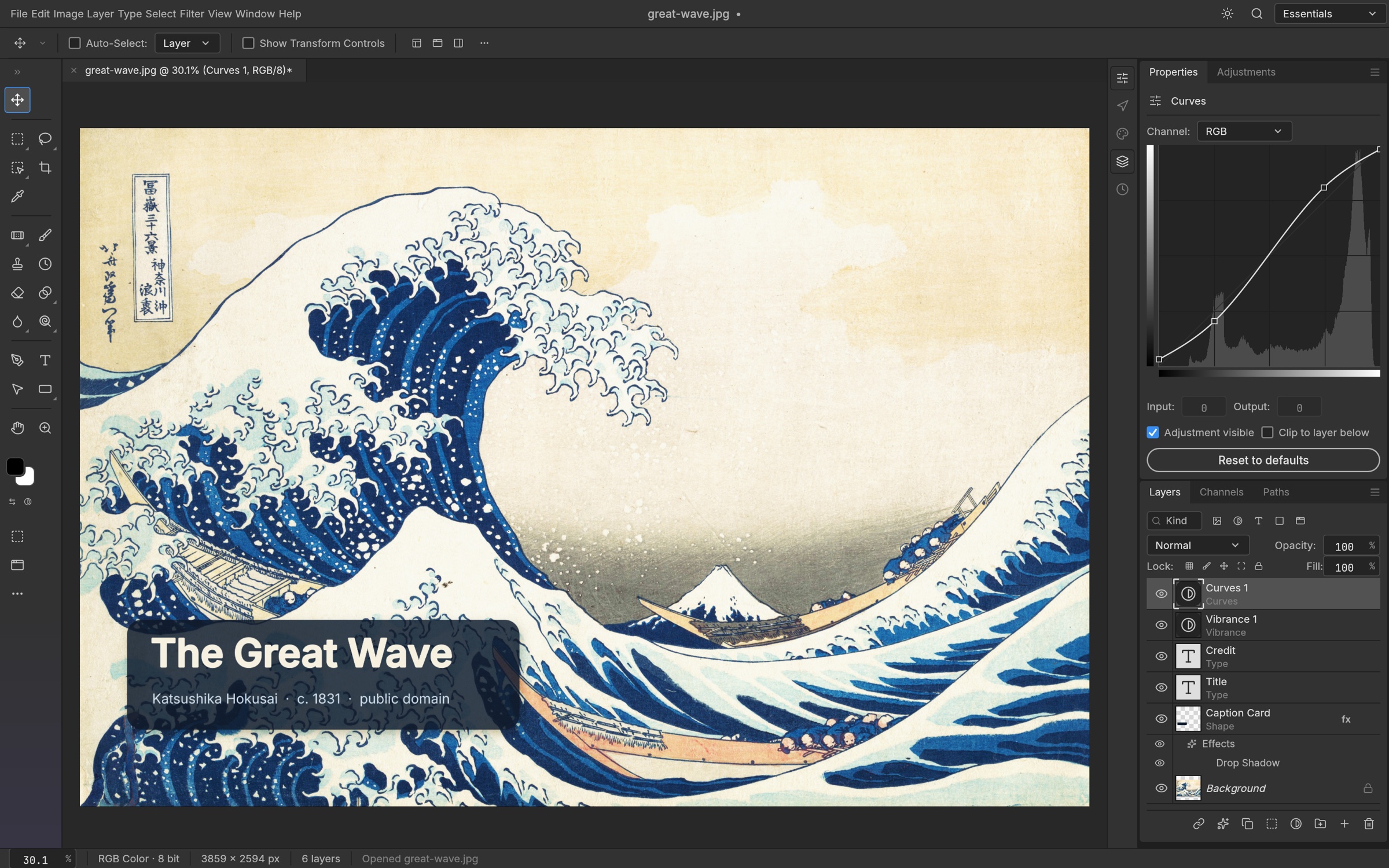
A caption card with a drop shadow, live type, and Vibrance and Curves adjustment layers, with the Curves editor open.
The Great Wave off Kanagawa, Katsushika Hokusai, c. 1831
What this edition adds · Features · Everything in the box · PSD · Agents · Under the hood · Get started · Downloads
Run it locally, step by step
Install Rust, the WebAssembly target and Trunk:
rustup target add wasm32-unknown-unknown
cargo install trunk --version 0.21.14 --locked
Get the code:
git clone https://github.com/Gitguy268/better-photocraft-web.git
cd better-photocraft-web
On a Mac, double-click
start.command. It builds the web version and serves it. Anywhere else, runtrunk build --releaseinapps/photocraft-weband servedist/webwith any web server.Open http://localhost:8780/ in your browser. Press
Ctrl+Cin the terminal to stop.
What this edition adds
This is PhotoCraft 0.7.0 with additions (version 0.7.0-better.1): the same app, name, menus
and tools as the official release, plus the following. Details, what answers which upstream issue
and what is not finished: docs/better-roadmap.md and CHANGELOG.md.
| What | Notes | |
|---|---|---|
| Liquid Glass theme (default) | Dark and light. Translucent panels over a blurred view of your image; menus, dialogs and cards have lens rims that bend the image behind them, split colours slightly and catch the light. | Reduce transparency in Preferences › Interface; opaque automatically on the CPU canvas path and when the browser asks for less transparency. The other themes are in Preferences › Interface. |
| Remove Background with local AI | One click from the Layer menu, Properties, the task bar or the command palette. Mask, new layer or cut-out; refine, feather, decontaminate. | The model runs on your device. The app asks before downloading it (U²-Netp, 4.4 MB, Apache-2.0). Without a model the built-in method runs. |
| Select Subject and Object Selection with local AI | The same model behind Select › Subject and the Object Selection tool. | `"model": "auto" |
| AI Upscale 2x / 4x | Filter › AI › AI Upscale. Pixel layers are rendered by a local Real-ESRGAN model, tile by tile. | 4.7 MB download, asked first. RGB and grayscale documents. Slow on large images in the browser, see the roadmap. |
| AI Denoise | Filter › AI › AI Denoise, or the task bar. The active pixel layer is cleaned by a local SCUNet model, tile by tile. | 74 MB download, asked first. About 1.1 s per 128 px tile in the browser. Without a model it runs Reduce Noise. |
| Object Selection by clicking | With MobileSAM installed (Filter › AI › AI Models), click an object with the Object Selection tool to select it; ⇧ adds, ⌥ subtracts. | 43 MB download. A few seconds for the first click in the browser, less after. Without it a click is a Quick Selection dab. |
| Plain-language commands | Edit › Search (⌘F): type "blur 5", "make it brighter", "remove the background" or "upscale 4x" and press Enter. | English and Dutch phrases, matched on the device; no language model. |
| Remove tool with local AI | With the LaMa model installed (Filter › AI › AI Models), the Remove tool fills what you paint over with it. | 198 MB download, never automatic. About 2 GB of memory; 10 to 25 s per stroke in the browser. Without the model the built-in fill runs. |
| Web: autosave and crash recovery | Unsaved documents are kept in the browser's IndexedDB and offered back after a crash or reload. | |
| Web: installable and offline | Install it as an app; it starts without a network after the first visit. | ?nosw turns the service worker off. |
| Web: save back to the same file | Where the browser has the File System Access API (Chromium). Elsewhere it downloads as before. | For PSD and the native format; flat formats ask each time, as on desktop. |
| Web: fonts from your device | Type › Use Fonts from This Device, where the browser has the Local Font Access API (Chromium). | The browser asks first. Files are read only when a family is used. |
| Color Replacement, Add/Delete Anchor Point, Free Transform right-click menu | Backported from upstream's later commits. |
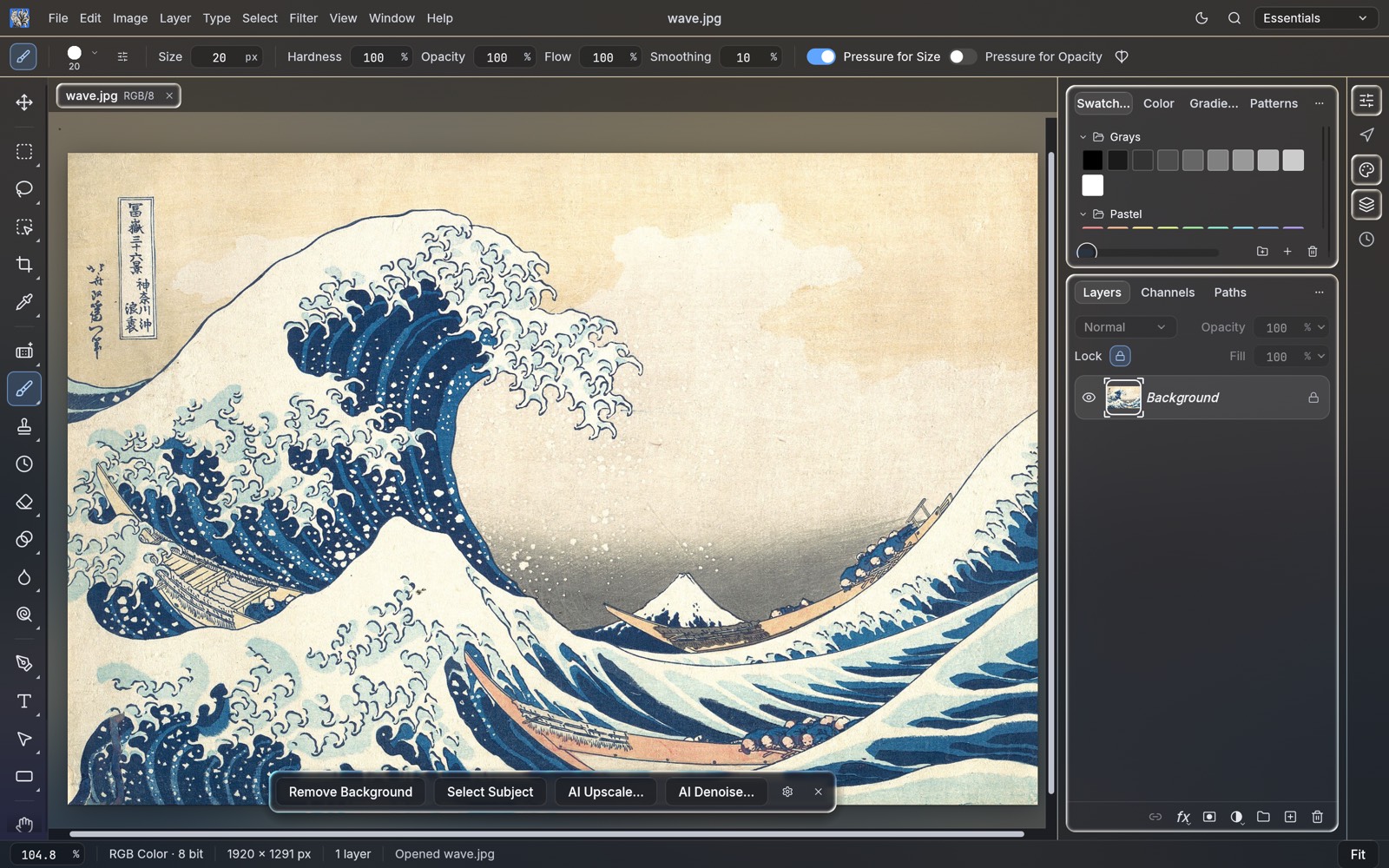
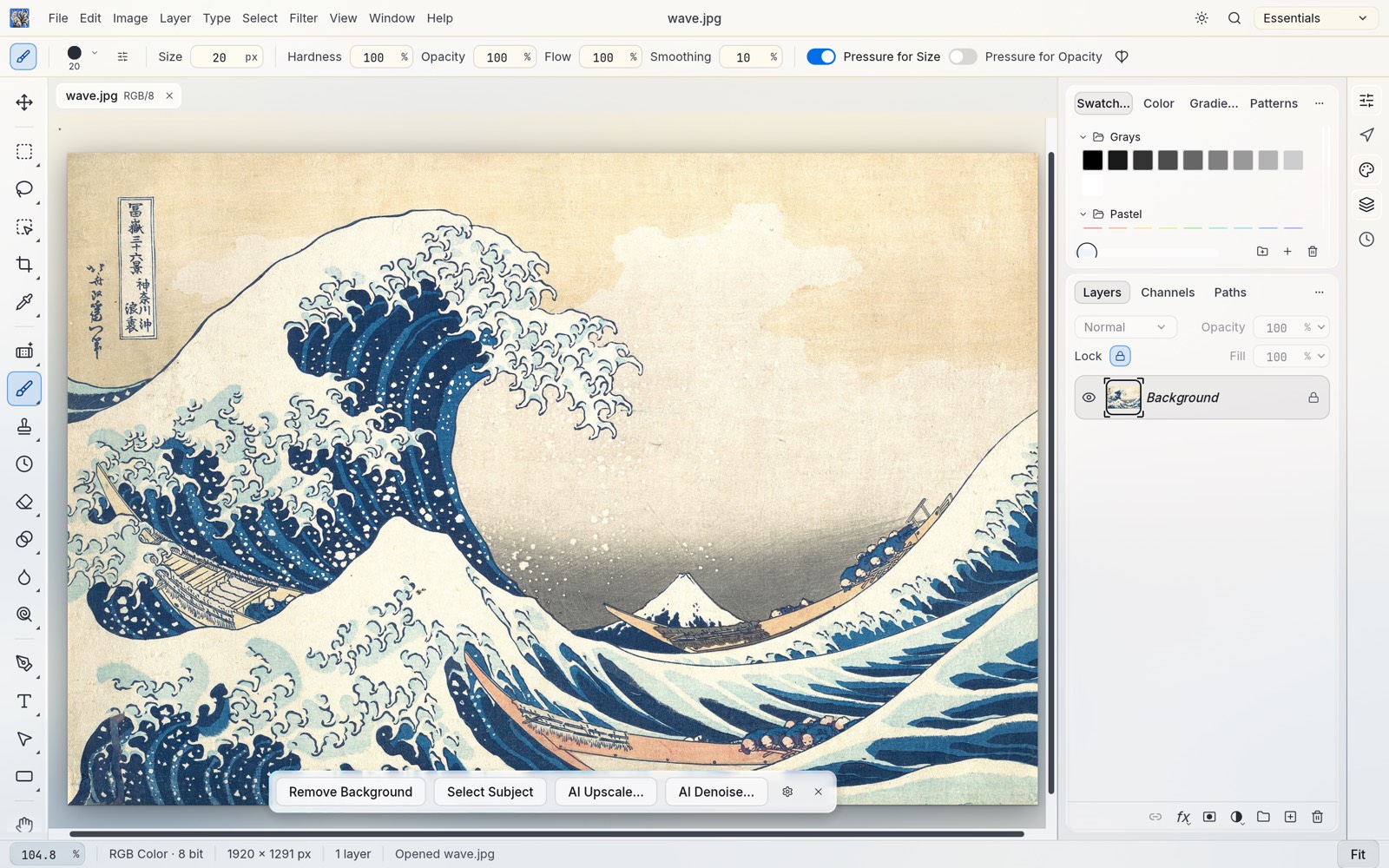
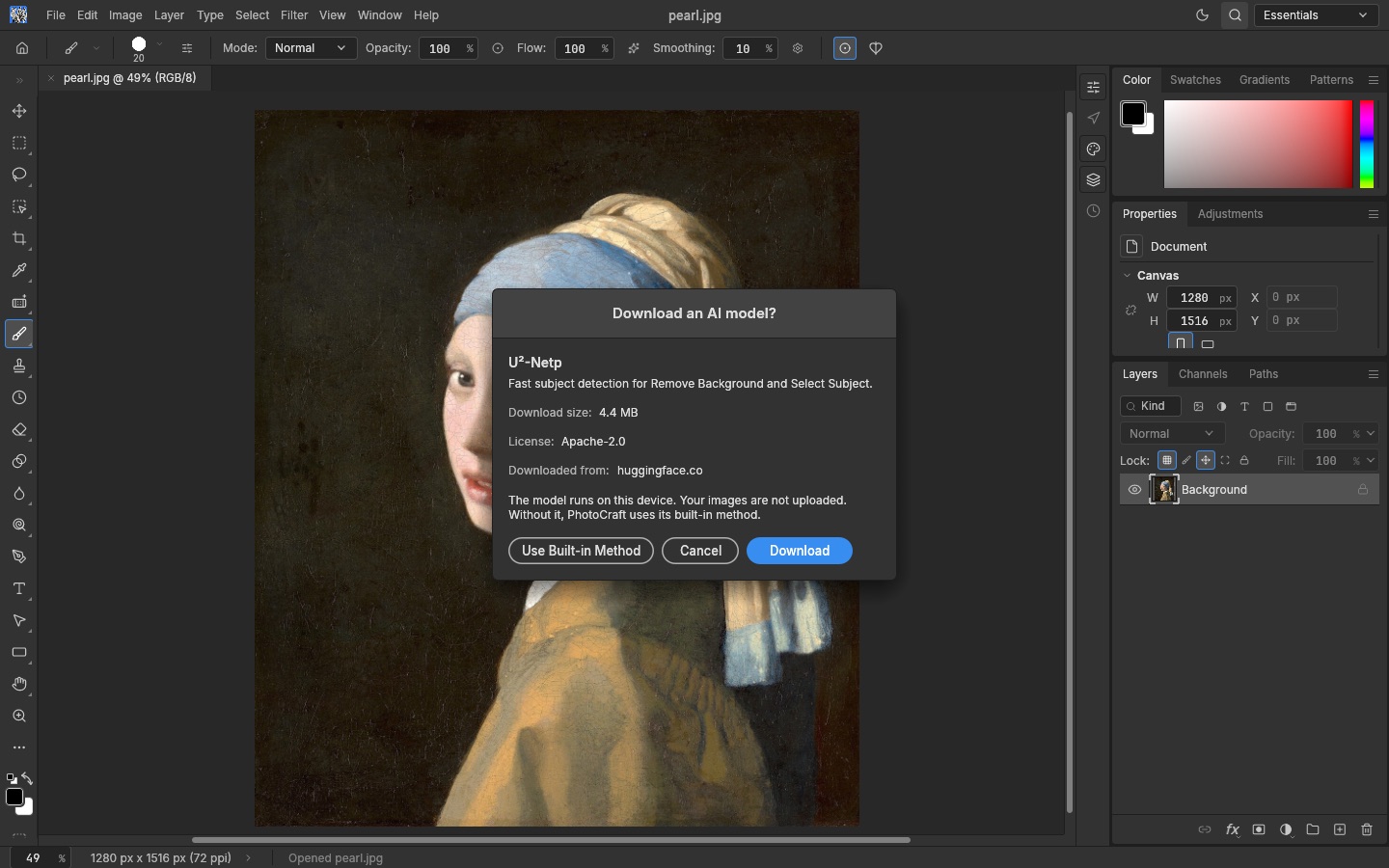
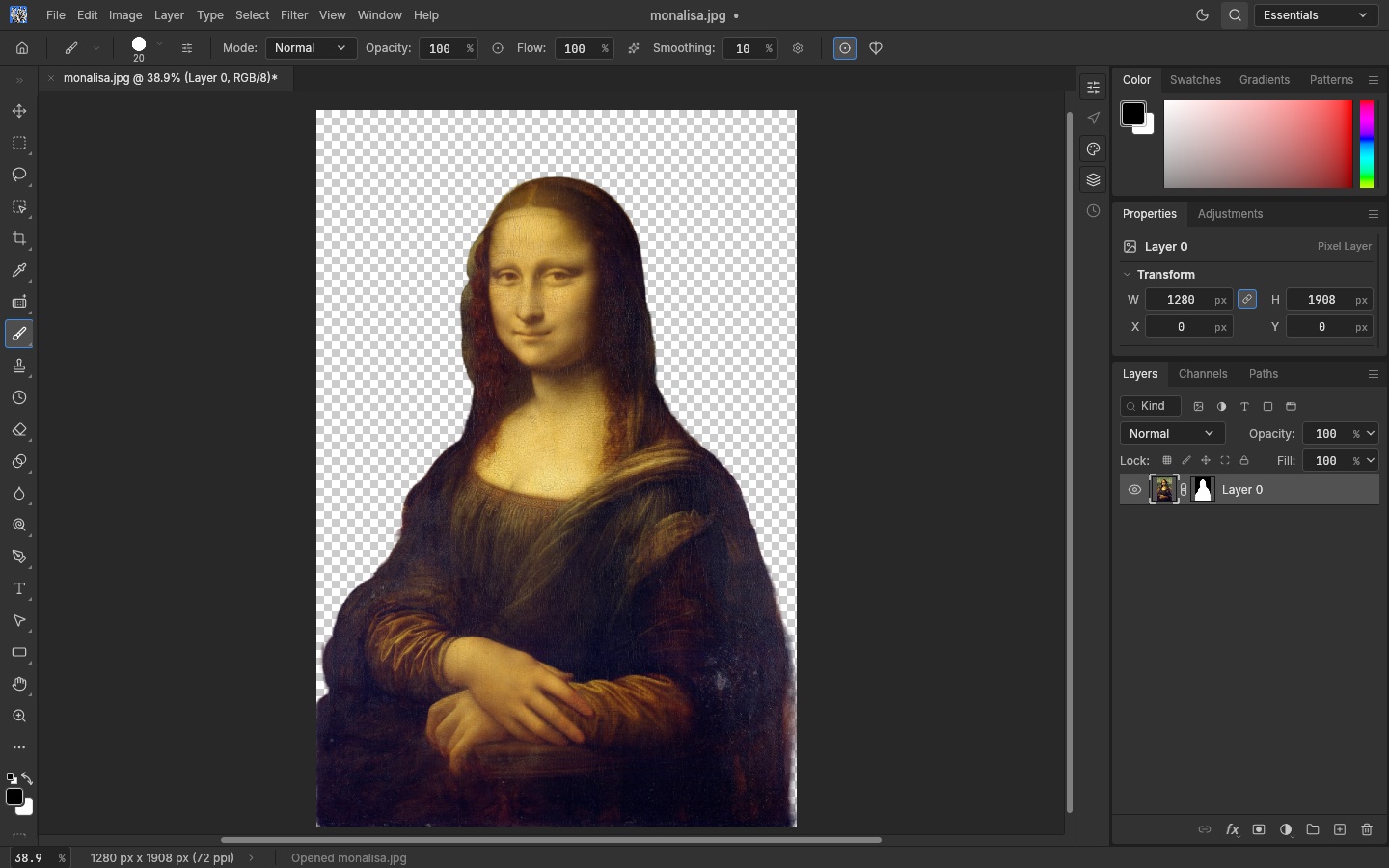
Asked before any download; then one click. The result is a layer mask, so nothing is destroyed.
Girl with a Pearl Earring, Johannes Vermeer, c. 1665 · Mona Lisa, Leonardo da Vinci, c. 1503–1519
Privacy and model downloads
- Everything runs on your device. No image, selection or document is uploaded by any feature.
- No model is bundled. A model is downloaded only after you agree to a prompt that shows its
name, size and licence. The download comes from
huggingface.co, is checked against a pinned SHA-256, and is kept in the browser's Cache Storage (web) or the app's settings folder (desktop). You can remove it in Filter › AI › AI Models. - The only other network use is the app's own files, and fonts the host chose to serve.
- Models, licences, sizes and pinned URLs:
docs/ai-models.md.
Build and run the web build
rustup target add wasm32-unknown-unknown
cargo install trunk --version 0.21.14 --locked     # the pinned version; wasm-opt comes from binaryen
cd apps/photocraft-web
trunk build --release                              # writes ../../dist/web (also builds the AI worker)
python3 -m http.server 8780 -d ../../dist/web      # then open http://localhost:8780/
On macOS you can double-click start.command in the repository root instead: it builds the web
version if it isn't built yet, serves it on port 8780 and opens it in the browser. Opening
dist/web/index.html from Finder doesn't work, because WebAssembly and the service worker need http.
packaging/web/package.sh builds the same site, checks the 24 MiB per-file size gate and writes
dist/release/better-photocraft-web-<version>.zip. Hosting notes (headers, CSP for model
downloads, the service worker): packaging/web/README.md, shipped as
HOSTING.md in the zip. Desktop: cargo run --release -p photocraft.
🎛️ Familiar by designThe menus, shortcuts, panels and tools are where your hands expect them, from ⌘J to ⇧⌘D. If you know Photoshop, you already know PhotoCraft. |
⚡ Native and fastA GPU compositor on wgpu (Metal, Vulkan, DX12, WebGPU), copy-on-write tiles and multithreaded filters. No Electron, no web view, no waiting. |
🗂️ Real PSD filesOpen, edit and save layered Photoshop documents. Re-saving keeps the render of 307 of the 309 psd-tools test files. |
🤖 Agent-readyEvery action is a command, so you can drive the same engine from the UI, the CLI, a JSON control channel or an MCP server. |
Features
Every screenshot here is the real app at work on public-domain art, rendered offscreen through its control channel.
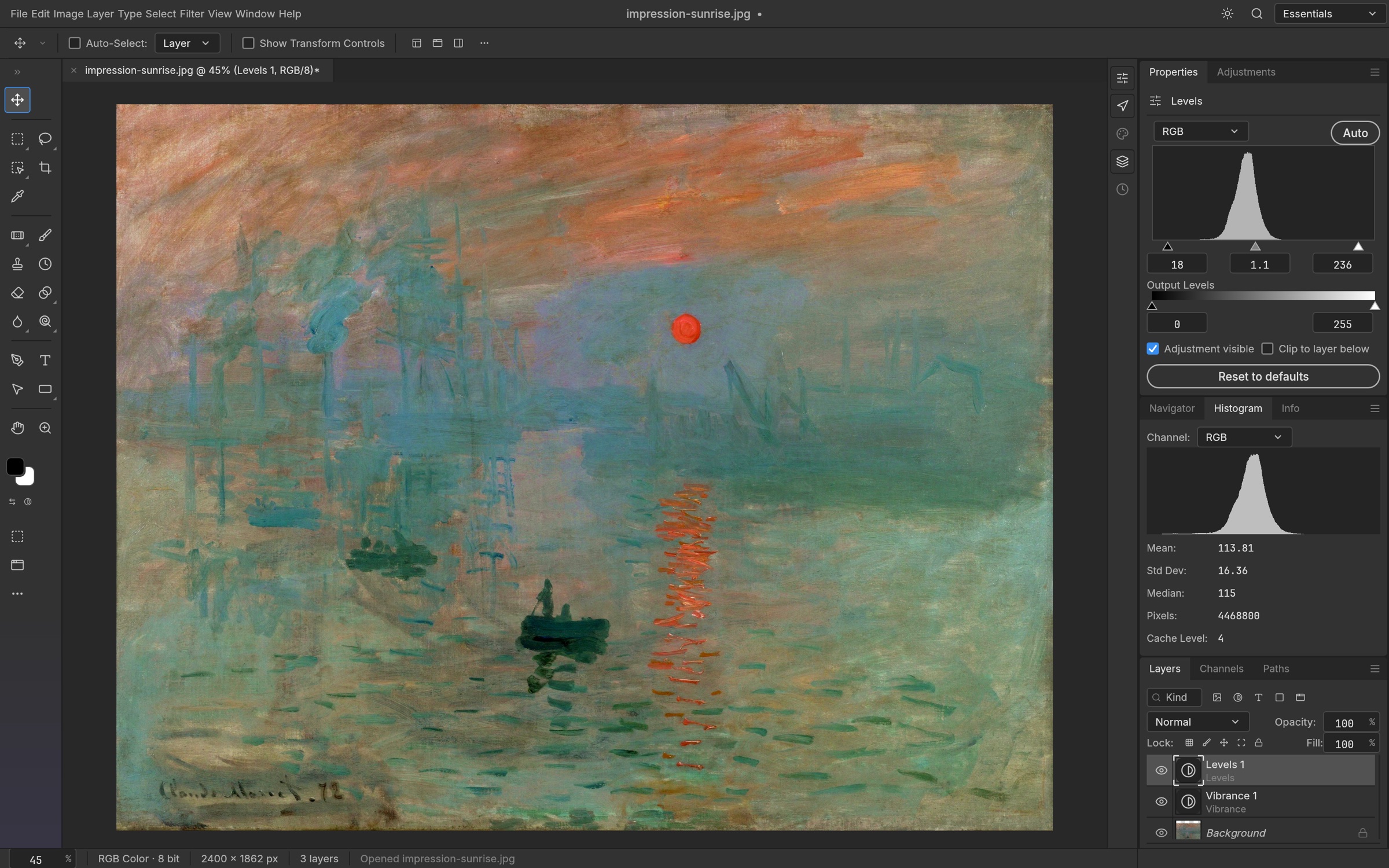
Levels and Vibrance adjustment layers, with the live Histogram panel. Impression, Sunrise, Claude Monet, 1872 Edit without regretAdjustment layers keep every edit live. Stack Levels, Curves, Vibrance, Hue/Saturation and a dozen more, mask them to an area, reorder them, or turn them off, and your original pixels never change.16 adjustment layers that also apply directly to pixels, including Curves with per-channel editing, Levels with a live histogram, Black & White, Channel Mixer, Gradient Map, Photo Filter, Selective Color and Color Lookup (.cube, .3dl, .look). Plus Shadows/Highlights, Replace Color, Match Color, HDR Toning, Desaturate and Equalize. |
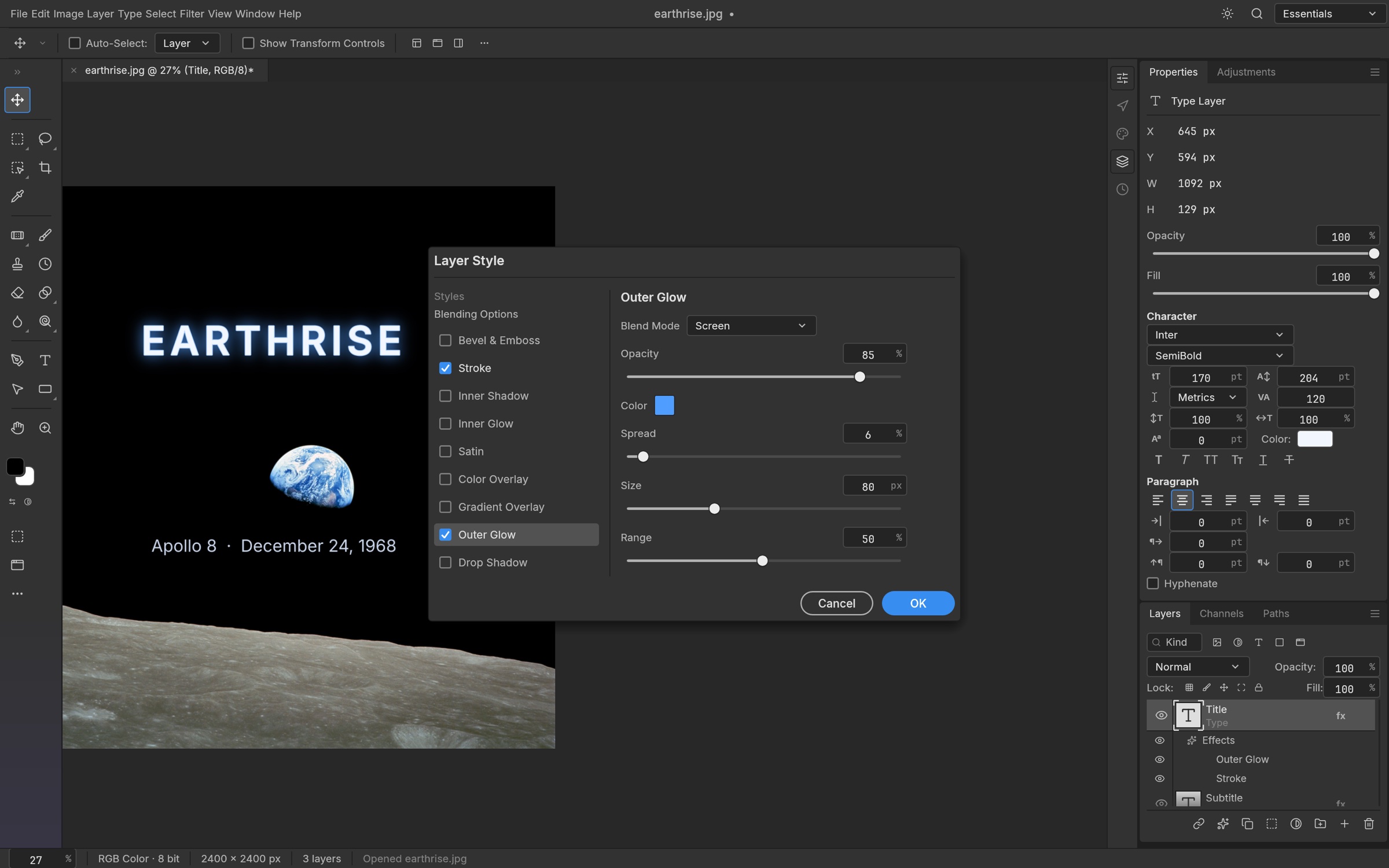
Outer Glow and Stroke on a live type layer, in the Layer Style dialog. Earthrise, William Anders / NASA, 1968 Styles that sell the shotDrop Shadow, Inner Shadow, Outer and Inner Glow, Bevel & Emboss, Satin, Stroke, and Color, Gradient and Pattern Overlay, live on any layer, including type. Patterns come from a library (built-ins, Edit › Define Pattern,.pat import/export) and PSD Patt blocks.
Copy and paste styles between layers, hide all effects at once, and open styles straight from your PSDs, rendered to match Photoshop. |
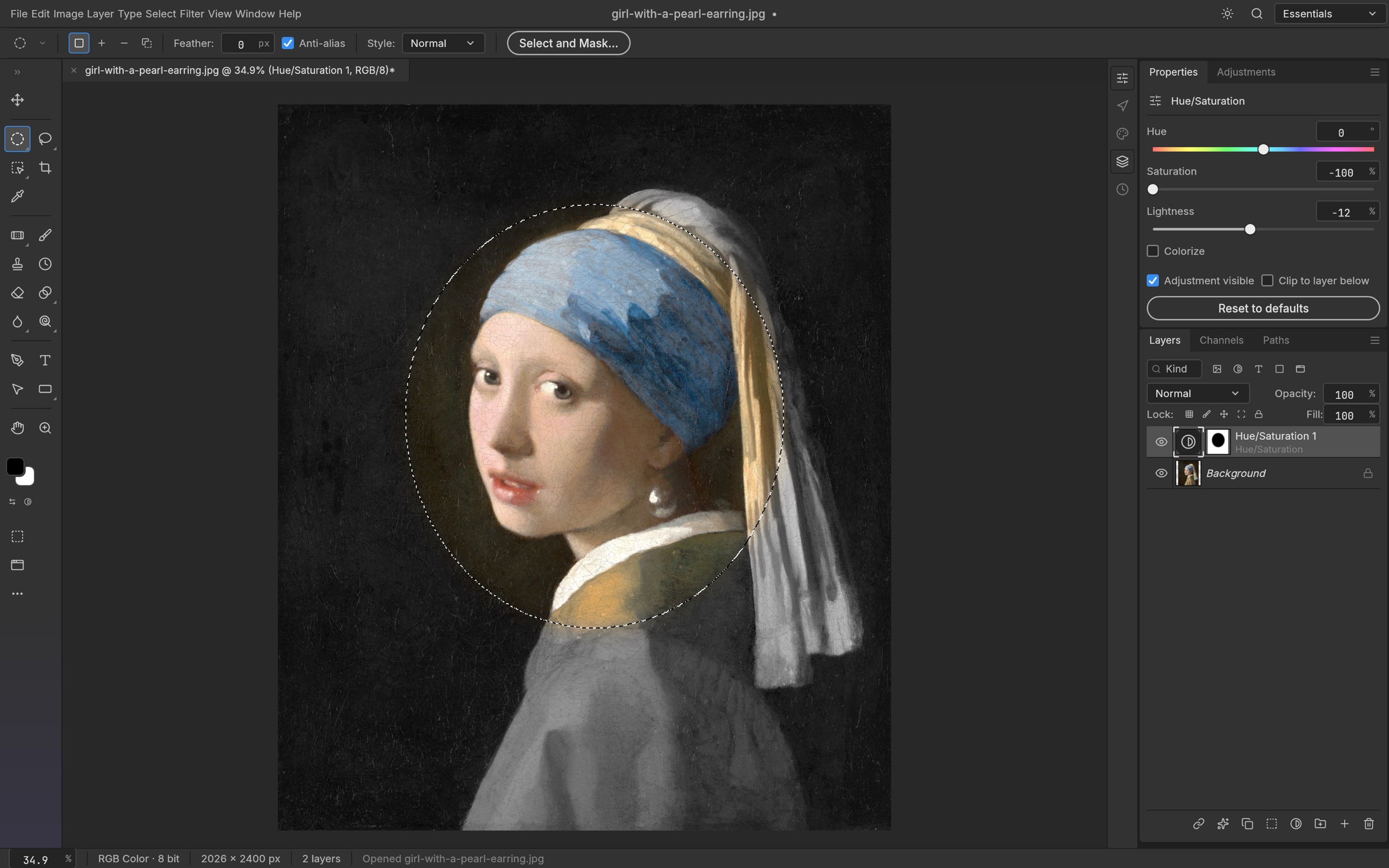
An elliptical selection becomes the mask of a Hue/Saturation layer, so only the face keeps its color. Girl with a Pearl Earring, Johannes Vermeer, c. 1665 Selections that understand your imageMarquees, lassos and the Magic Wand for precision; Quick Selection, Object Selection and Select Subject when you want the computer to do the tracing; Select and Mask to refine hair-fine edges.Feather, expand, contract, smooth, grow, reselect. Turn any selection into a layer mask, a vector path or a shape. Smart selection runs on your machine, with no cloud and no account. |
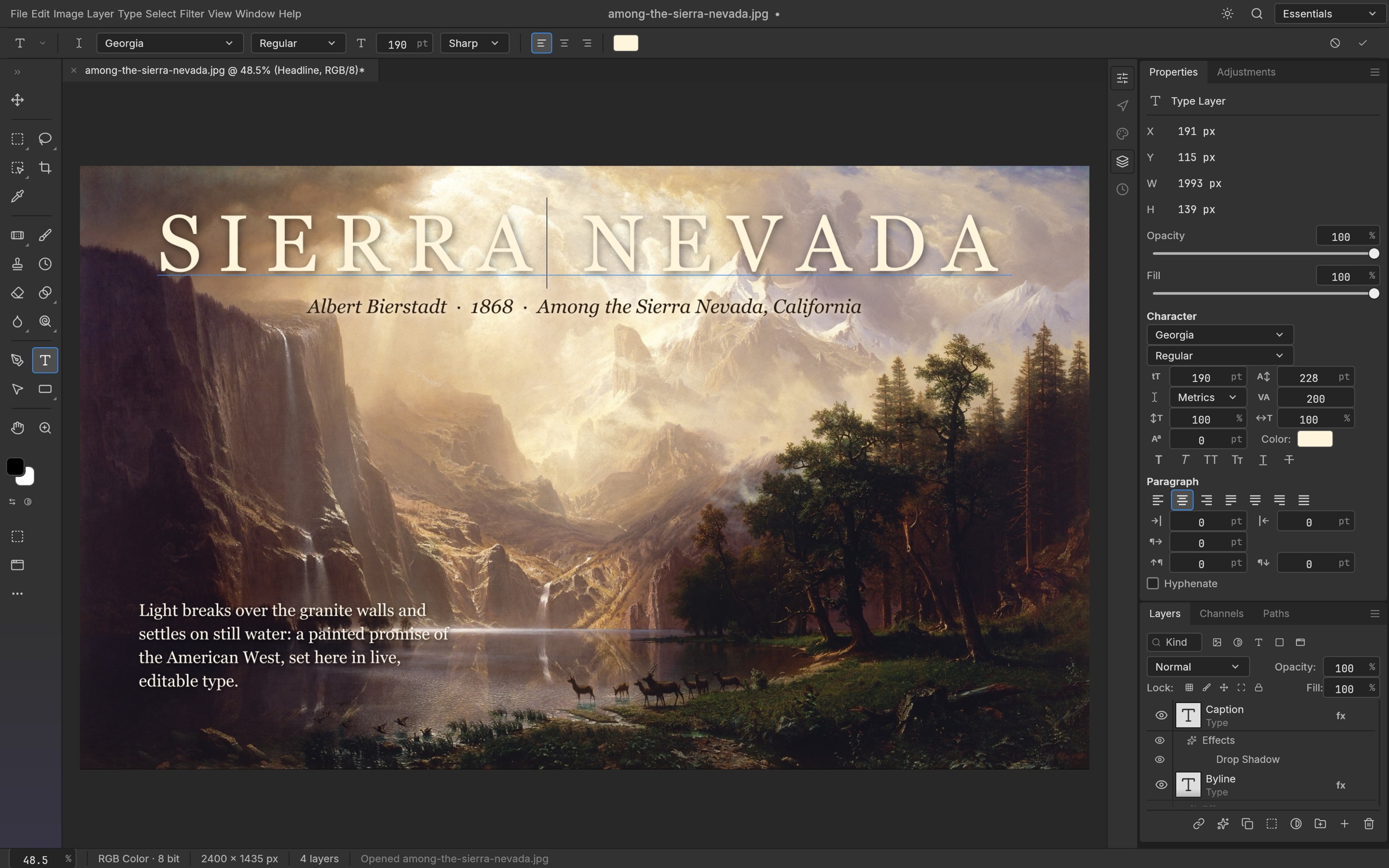
A headline edited in place, with a byline and a paragraph of body text. Among the Sierra Nevada, California, Albert Bierstadt, 1868 Type that sets beautifullyPoint and paragraph text, edited right on the canvas, with full Character and Paragraph controls: font, weight, size, leading, tracking, alignment and colour. The full Type Color Picker also supports screen sampling with a pixel loupe.Type layers stay editable, take layer styles, and round-trip through PSD. |
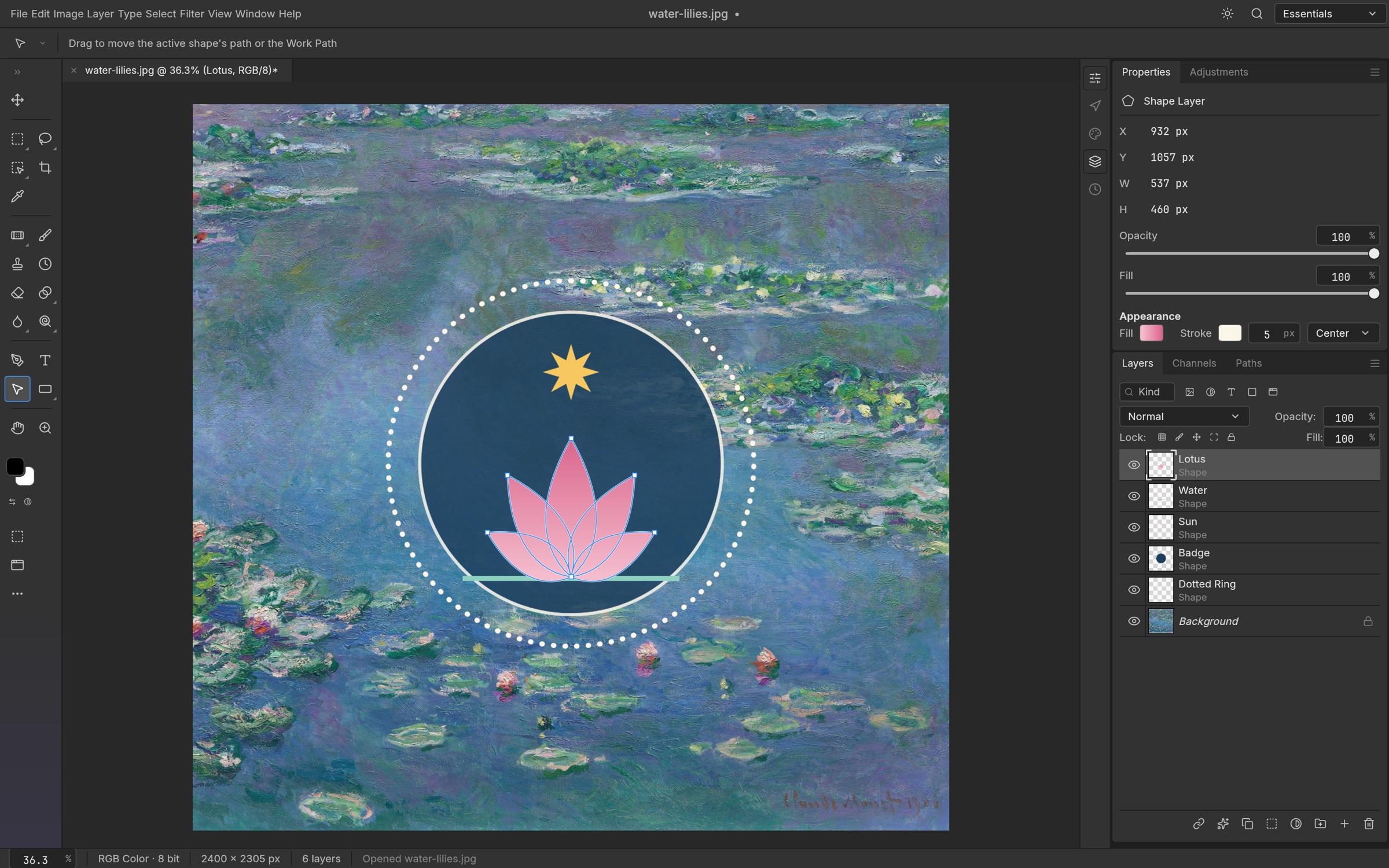
A badge made of shape layers: a gradient-filled lotus, a star and a dotted ring. Water Lilies, Claude Monet, 1906 Pixel-perfect vectorsRectangle, Ellipse, Triangle, Polygon, Line and the Pen, Freeform Pen and Curvature Pen tools, with resolution-independent shape layers, gradient fills, and dashed, aligned strokes.Combine shapes (unite, subtract, intersect, exclude), keep paths in the Paths panel, use them as vector masks, or stroke and fill them. 116 of 116 shape layers in our PSD corpus match Photoshop's pixels. |
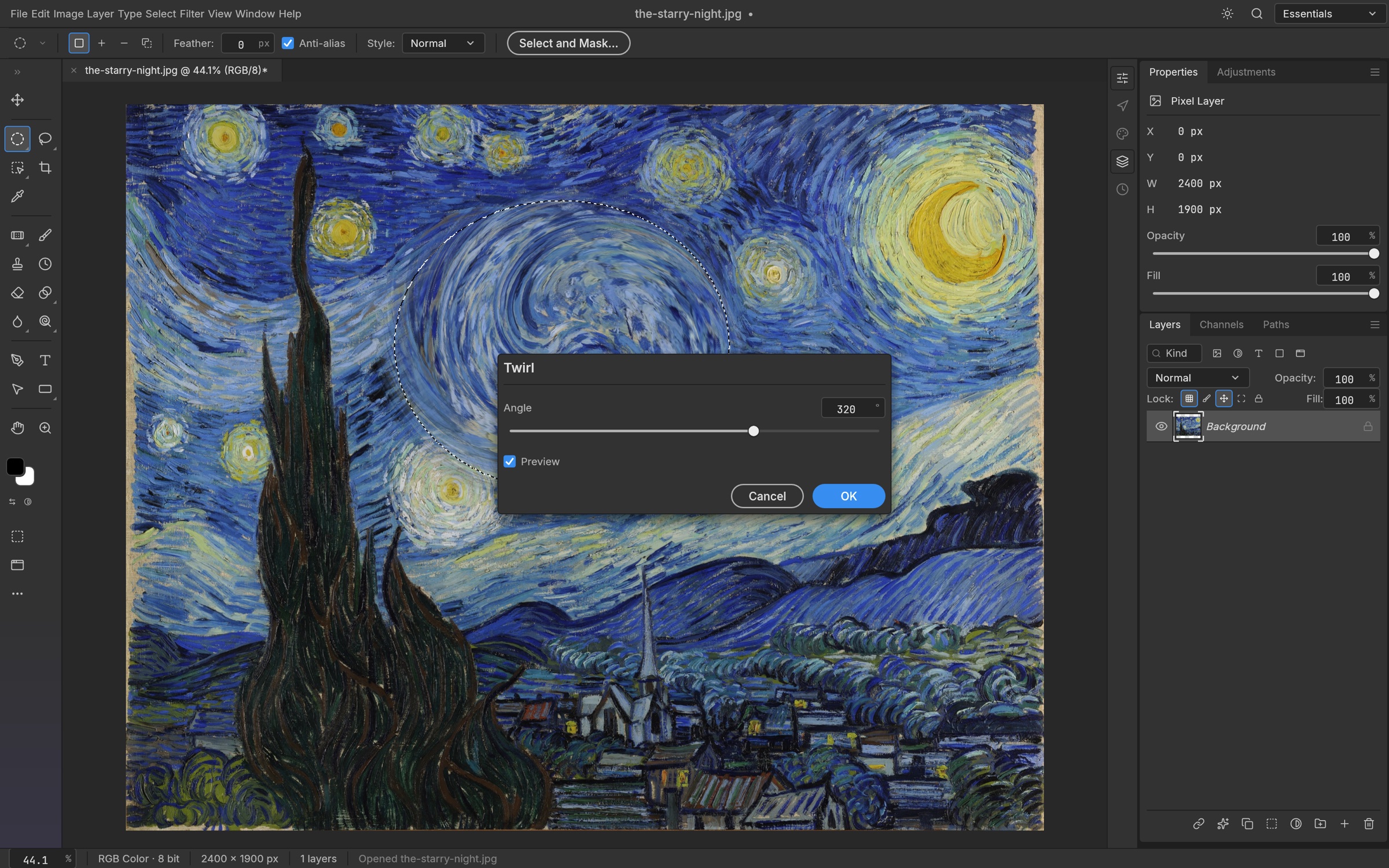
Twirl previews live on the canvas, only inside the selection. The Starry Night, Vincent van Gogh, 1889 See it before you commitEvery filter dialog previews live on the canvas, through your selection. Blurs (Gaussian, Box, Motion, Radial, Surface, Smart, Lens, Shape, and the Blur Gallery: Tilt-Shift, Iris, Field, Spin, Path), sharpening, Reduce Noise, distortions (Twirl, Wave, Ripple, Displace, Shear, Zig Zag…), Pixelate, Stylize (Oil Paint, Wind, Extrude…), Render (Clouds, Fibers, Lens Flare, Lighting Effects) and more.Run filters on a smart object and they stay editable: change, hide, reorder or mask them at any time. Large-radius blurs use running-sum box passes across all cores: a radius-180 Gaussian on 3.6 MP takes under a second. |
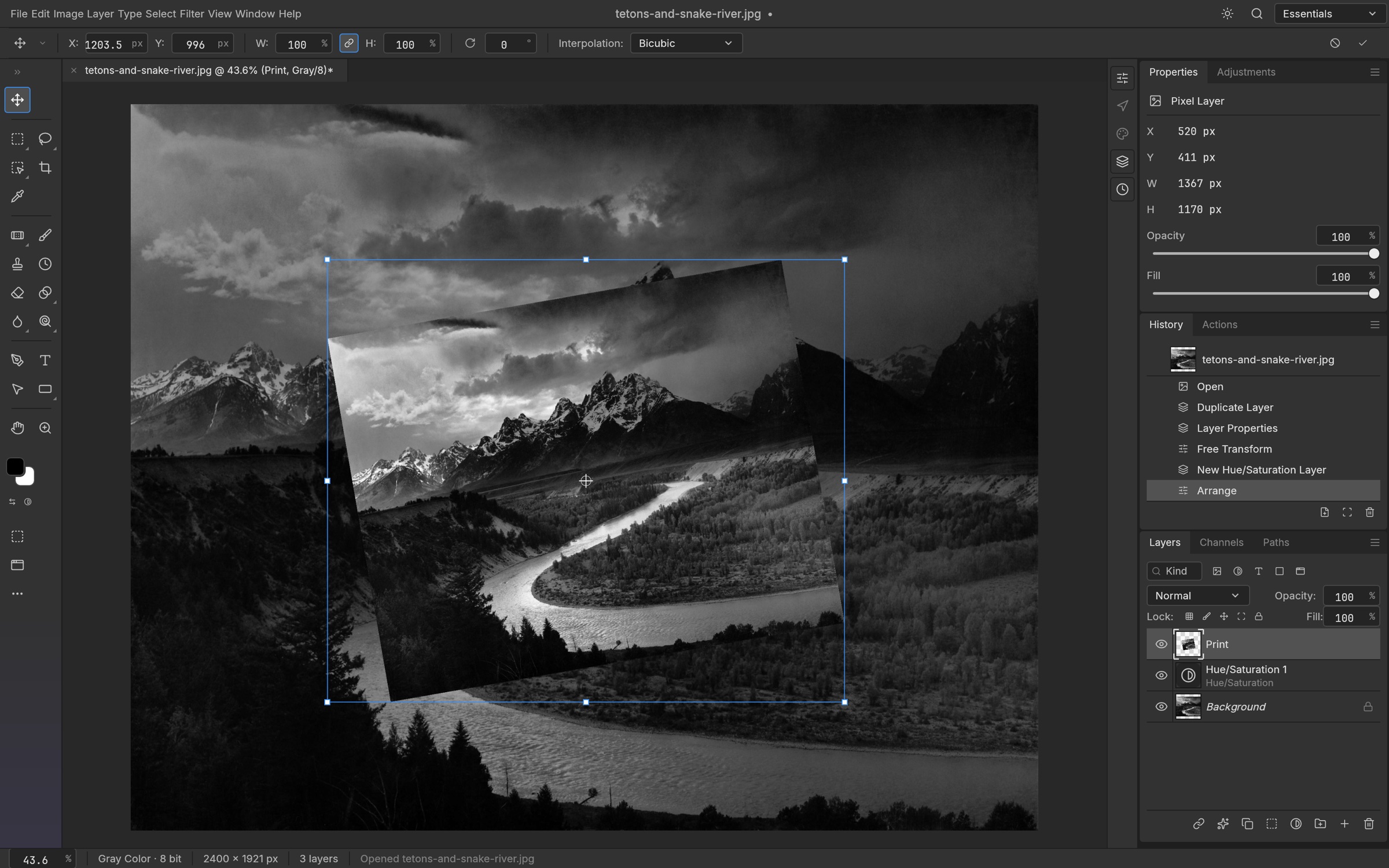
Free Transform on a rotated print, with every step listed in History. The Tetons and the Snake River, Ansel Adams, 1942 Shape it any way you likeFree Transform with scale, rotate, skew, distort and perspective; exact 90° and 180° rotations and flips; Transform Again. Layers, type, shapes, masks and selections all transform together.Full history, Toggle Last State and the History Brush mean every step can be undone, even one brush stroke at a time. |
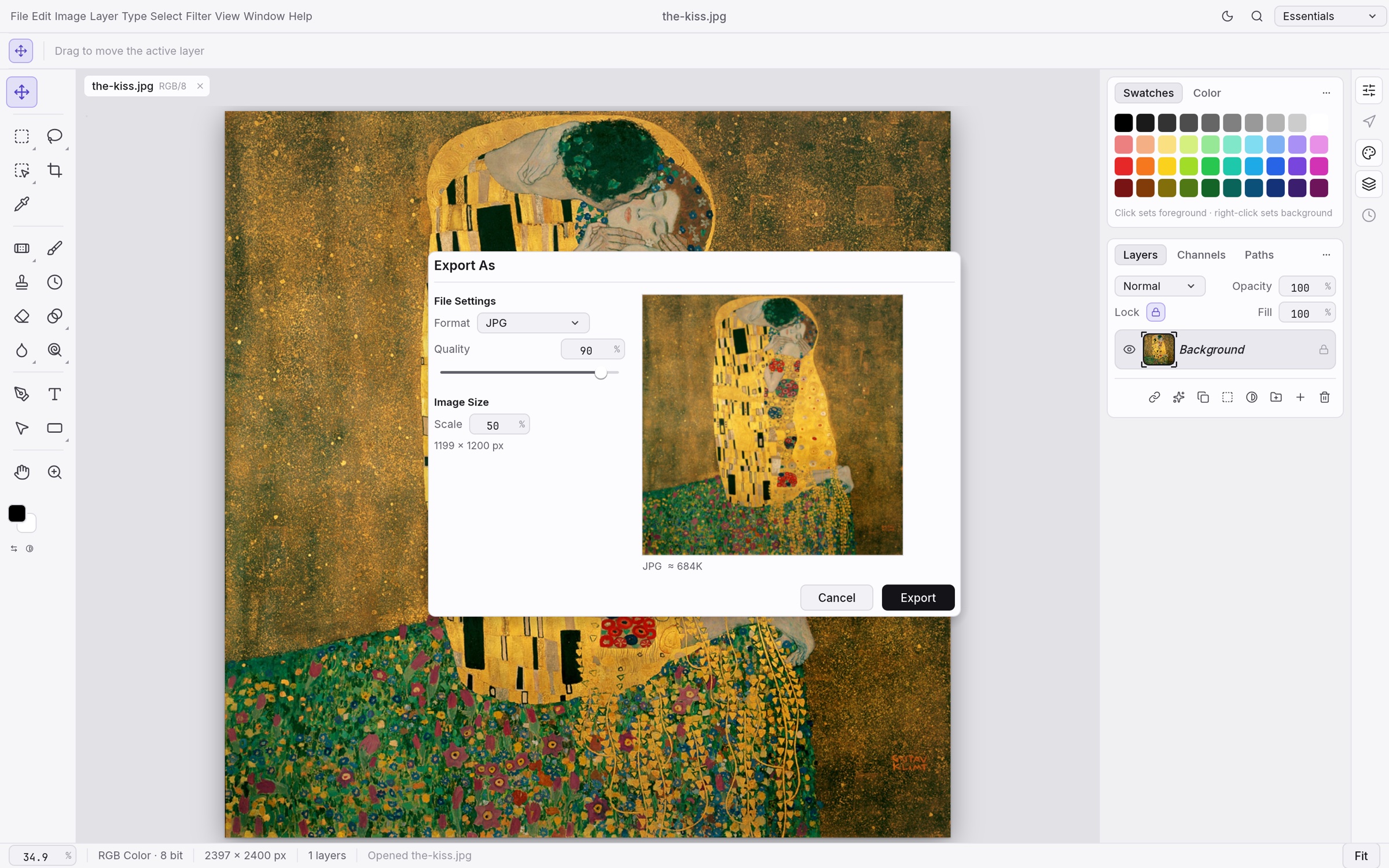
Export As in the light theme, with a preview and a file-size estimate. The Kiss, Gustav Klimt, 1907–1908 Ship it anywhereExport As with format, quality, transparency and scale, plus a preview and an instant file-size estimate. Quick Export to PNG in one click.Choose a dark Pro theme, the airy Studio themes, or a Classic look. |
Everything in the box
🧰 68 toolsMove · Artboard · Rectangular and Elliptical Marquee · Single Row Marquee · Single Column Marquee · Lasso · Polygonal Lasso · Magnetic Lasso · Object Selection · Quick Selection · Magic Wand · Crop · Perspective Crop · Slice · Slice Select · Frame · Eyedropper · Color Sampler · Ruler · Note · Count · Remove · Spot Healing Brush · Healing Brush · Patch · Content-Aware Move · Red Eye · Brush · Pencil · Mixer Brush · Color Replacement · Clone Stamp · Pattern Stamp · History Brush · Art History Brush · Eraser · Background Eraser · Magic Eraser · Gradient · Paint Bucket · Blur · Sharpen · Smudge · Dodge · Burn · Sponge · Pen · Freeform Pen · Curvature Pen · Add Anchor Point · Delete Anchor Point · Convert Point · Horizontal and Vertical Type · Horizontal and Vertical Type Mask · Path Selection · Direct Selection · Rectangle · Ellipse · Triangle · Polygon · Line · Custom Shape · Hand · Rotate View · Zoom |
🖌️ A real brush engineShape Dynamics, Scattering, Texture, Dual Brush, Color Dynamics, Transfer, Brush Pose, Wet Edges, Build-up and Smoothing (including Pulled String), driven by pen pressure, tilt, rotation and direction. Brush presets, Define Brush from Selection, and deterministic, replayable strokes. |
🗃️ Layers, done properlyGroups, clipping masks, pixel and vector masks, fill layers (solid, gradient and pattern), adjustment layers, live smart objects with smart filters and lossless transforms and warps, multi-layer selection with align, distribute and link, alpha channels and Quick Mask, 27 Photoshop blend modes plus six Paint.NET variants, opacity and fill, locks, colour labels, a layer kind filter, merge, flatten, rasterize, Layer via Copy/Cut, Paste Into. |
🎨 Any colour, any depthRGB, Grayscale, CMYK and Lab documents at 8, 16 and 32 bits per channel. Bit depth and colour model are runtime data, so every tool works at every depth.Real ICC colour management in pure Rust: embedded profiles, Assign and Convert to Profile with all four rendering intents and black point compensation, soft proofing (⌘Y) and Gamut Warning (⇧⌘Y) on the GPU. |
🗂️ FormatsPSD and PSB, layered TIFF (Photoshop's layer data in the TIFF, read and written in either byte order), Paint.NET PDN3 (read, with editable layers and all 14 blend modes), OpenRaster (read and write, with layers, groups and blend modes, for Krita, MyPaint and GIMP), GIMP XCF (read, with layers, groups, masks, blend modes, channels and the selection), Krita .kra (read, with paint layers, groups, blend modes and transparency masks), SVG (opens as shape layers, places as a vector Smart Object), plus flat PNG, JPEG, TIFF, WebP (lossy and lossless), GIF, BMP, TGA, ICO, QOI, PNM, OpenEXR, Radiance HDR and FITS (astronomy images: 8/16-bit and 32-bit float, gray or RGB, header kept), and the native.pcraft format. Flat formats retain the depths they support: PNG keeps 8/16-bit samples, TIFF keeps 8/16-bit and 32-bit float samples, and OpenEXR keeps half/float samples; JPEG, WebP and the other 8-bit formats reduce higher-depth samples with an export warning. See the codec capability matrix for each format. HEIC photos from iPhone and Mac are read-only (included in official builds; optional --features heif for source builds). AVIF is write-only with the optional avif build feature; AVIF decoding and JPEG XL are unavailable. Affinity documents (.af, .afdesign, .afphoto, .afpub) open natively, read only, with artboards, layers, vectors, text, images and masks; effects, adjustments and other unsupported parts are listed in a warning, and Affinity export is unavailable.
|
🪄 The everyday essentialsAuto Tone, Contrast and Color · Equalize · Image and Canvas Size · Crop and Trim · Reveal All · Edit › Fill and Stroke · Copy Merged · Paste in Place · guides, rulers, grid and snapping · Actions record and replay · a command palette (⌘F). |
PSD without compromise
PhotoCraft's PSD support is a standalone crate written from Adobe's public specification and tested against a corpus of real-world files.
- Faithful round trips: opening and re-saving a document renders the same for 307 of the 309 files in the psd-tools test set and 169 of 170 in our mixed ag-psd/psd-tools set (
crates/io/tests/it/corpus.rs; fetch the psd-tools set withcargo xtask corpus --psd-tools), and anything we don't model yet (raw blocks, descriptors, extras) is carried over instead of being dropped. A re-saved file is not byte-identical to its source: PhotoCraft rewrites image resources, layer records and the composite. Only the standalonephotocraft-psdcrate, parsing and writing a file without the document model, reproduces every parseable corpus file byte for byte (crates/psd/tests/it/corpus.rs). - Pixels that match: a composite oracle compares our render with Photoshop's own merged image, covering gradient interpolation (Classic, Perceptual and Linear), layer effects, shape strokes, clipping and fill opacity.
- Large documents: PSB, 16 and 32-bit files, and CMYK and Lab documents open natively.
Built for agents
Every menu item, tool and dialog runs a command from one registry of 500+ commands. The UI, the CLI, the JSON control channel and the MCP server all call the same commands, so anything you can click, a script or an AI agent can do too.
# Headless: open, edit, save
photocraft-cli run wave.psd \
  --cmd filter.sharpen.smartSharpen     --params '{"amount":80}' \
  --cmd layer.newAdjustmentLayer.curves --params '{"points":[[0,0],[64,48],[192,212],[255,255]]}' \
  --out wave-final.png

# Apply one action list to a folder of images
photocraft-cli batch --actions grade.json --in ./raw --out ./graded

# Every subcommand explains itself
photocraft-cli batch --help

# Let an agent drive it over MCP (headless, or bridged to the running app)
photocraft-cli mcp
The desktop app also offers an authenticated, loopback-only control channel (photocraft --control) for inspecting UI state, driving tools with pointer events, and taking offscreen screenshots. Every image in this README was rendered that way. See docs/control-protocol.md.
Under the hood
- Engine first: a pure-data document model and a command engine, with a thin egui UI on top. Layering is enforced at build time across 24 crates.
- Two compositors: a CPU compositor serves as the reference oracle, and a wgpu compositor puts the canvas on the GPU. They are tested against each other.
- Copy-on-write tiles: 256² sparse tiles make undo cheap and huge canvases light, and effect maps are cached per layer state.
- Runs in the browser: the whole engine and UI compile to WebAssembly.
- Clean-room: implemented from public specs and observed behaviour only. No proprietary code, shaders or assets.
- Tested: more than 1,700 tests, including PSD round trips, synthetic generators, compositor oracles and multi-depth checks.
Get started
git clone https://github.com/TODO-USERNAME/Better-Photocraft-Web
cd Better-Photocraft-Web
cargo run --release -p photocraft -- image.psd   # the desktop app
cargo test --workspace                           # the test suite
Japanese fonts for the UI and Type tool come from craft-fonts, an optional build input (desktop release builds always include it). Without it PhotoCraft uses your system's CJK fonts:
git clone https://github.com/storytold/craft-fonts ../craft-fonts
CRAFT_FONTS_DIR="$PWD/../craft-fonts" cargo run --release -p photocraft
New contributors and AI agents: start with AGENTS.md, then docs/.
Installers for macOS, Windows, Linux, FreeBSD and the web are attached to each GitHub release. On Linux you can pick an AppImage, a .deb, an .rpm, a tarball or a Flatpak bundle. The bundle needs the freedesktop runtime from Flathub, which flatpak offers to install along with it:
flatpak install --user photocraft-<version>-linux-x86_64.flatpak   # or -linux-aarch64
flatpak run ai.storyteller.photocraft
The Flatpak prints through the host's CUPS socket (File › Print talks IPP to it directly, no lp needed); without CUPS, or without a printer, File › Print opens the system print dialog through the print portal. See printing.
The AppImage needs no install: the first run registers its launcher icon and menu entry in ~/.local/share so the dock shows PhotoCraft's icon on Wayland. Set PHOTOCRAFT_NO_DESKTOP_INTEGRATION=1 to skip that, and see docs/releasing.md › Linux to undo it.
On a Wayland session, files dropped on the window don't open yet: winit 0.30, the windowing library under egui, has no Wayland drag and drop (#386). Use File › Open, or copy the image in your file manager and paste it with Ctrl+V. To drag and drop, start PhotoCraft under XWayland: WAYLAND_DISPLAY= photocraft, WAYLAND_DISPLAY= ./photocraft-<version>-linux-x86_64.AppImage, or flatpak run --nosocket=wayland --socket=x11 ai.storyteller.photocraft. On Wayland, PhotoCraft shows the command for your install in a notice until you dismiss it. Preferences › Performance › Linux display server = X11 does the same on every launch. With a fractional display scale (125%, 150%, 175%) an XWayland window is drawn at a lower resolution and enlarged by the compositor, so the interface is blurred there; native Wayland stays sharp (#1072).
On macOS, the command-line tool comes as photocraft-cli-<version>-macos-universal.zip. The binary is signed with the same Developer ID as the app and notarized by Apple. A bare binary can't carry a stapled notarization ticket the way the DMG does, so the first time you run it macOS checks the notarization online. You can confirm it yourself:
ditto -x -k photocraft-cli-<version>-macos-universal.zip .
spctl --assess --type install -vv photocraft-cli-<version>-macos-universal/photocraft-cli
# ... accepted, source=Notarized Developer ID
On FreeBSD 14 (x86_64), the release has a tarball laid out like /usr/local. Install the runtime libraries, then unpack it there:
pkg install libxkbcommon wayland libX11 libXcursor libXrandr libXi libxcb mesa-libs vulkan-loader gtk3 fontconfig freetype2 alsa-lib
tar -xzf photocraft-<version>-freebsd-x86_64.tar.gz --strip-components 1 -C /usr/local
photocraft
Maintainers: docs/releasing.md explains how releases are built, signed and published.
[!IMPORTANT] Status: PhotoCraft is in early alpha, and we want to be straight about where it stands: much of Photoshop's feature surface exists in some form, but it is not yet a Photoshop replacement for daily professional work. The biggest gaps are AI/generative features, 15 missing tools, depth in typography and pro workflows, and plug-in compatibility. Every Photoshop menu item is wired to a command (
docs/parity-checklist.md), but that measures wiring, not behaviour. The honest, dimension-by-dimension picture and where we're going next are in the roadmap and parity assessment. Expect rough edges, and please file issues (include your OS, document size, layer count and a screenshot). You can also tell us what broke on Discord.
Community packages
These installers are maintained by community members, not by the PhotoCraft team.
On Gentoo, the ::snakebyte overlay packages the Linux release as media-gfx/photocraft-bin:
eselect repository add snakebyte git https://github.com/switch87/snakebyte-overlay.git
emaint sync -r snakebyte
echo 'media-gfx/photocraft-bin ~amd64' >> /etc/portage/package.accept_keywords/photocraft
emerge --ask media-gfx/photocraft-bin
Documentation
Developer, architecture, automation, format, and security documentation is maintained in the PhotoCraft documentation book.
To self-host the browser version with Docker, see Docker web hosting.
Security
Security architecture, threat modeling, parser hardening, fuzzing, and vulnerability reporting are covered in the security documentation and the repository security policy.
Test corpora
PhotoCraft is tested against real files: our own Photoshop-authored oracle PSDs in
photocraft-corpus plus the psd-tools, ag-psd and PngSuite sets, pinned and
sha256-verified. Fetch them with cargo xtask corpus --all and run the tests with
cargo xtask test-corpus (details in docs/development.md).
Downloads
This edition has no published builds yet: build it from source (above). The tables below describe
the official PhotoCraft builds, which do not contain this edition's additions; get those from
the official releases. <ver> in the file names is the version.
Windows
| Build | Installer | Portable |
|---|---|---|
| x64 (64-bit Intel/AMD) | photocraft-<ver>-windows-x64.msi |
photocraft-<ver>-windows-x64-portable.zip |
| arm64 (Snapdragon and other ARM PCs) | photocraft-<ver>-windows-arm64.msi |
photocraft-<ver>-windows-arm64-portable.zip |
| x86 (32-bit) | photocraft-<ver>-windows-x86.msi |
photocraft-<ver>-windows-x86-portable.zip |
Installers and executables are code-signed.
macOS
| Build | File | Notes |
|---|---|---|
| App, universal (Apple silicon + Intel) | photocraft-<ver>-macos-universal.dmg |
Signed and notarized |
| Command-line tool, universal | photocraft-cli-<ver>-macos-universal.zip |
Signed and notarized |
Linux
| Format | x86_64 | aarch64 (ARM64) | Notes |
|---|---|---|---|
| AppImage | photocraft-<ver>-linux-x86_64.AppImage |
photocraft-<ver>-linux-aarch64.AppImage |
Runs anywhere; updates itself with AppImageUpdate (.zsync files) |
| Flatpak | photocraft-<ver>-linux-x86_64.flatpak |
photocraft-<ver>-linux-aarch64.flatpak |
Sandboxed; flatpak install --user <file> |
| Debian/Ubuntu | photocraft-<ver>-linux-x86_64.deb |
photocraft-<ver>-linux-aarch64.deb |
|
| Fedora/RHEL/openSUSE | photocraft-<ver>-linux-x86_64.rpm |
photocraft-<ver>-linux-aarch64.rpm |
|
| Tarball | photocraft-<ver>-linux-x86_64.tar.gz |
photocraft-<ver>-linux-aarch64.tar.gz |
Unpack anywhere |
RISC-V (riscv64): photocraft-<ver>-linux-riscv64.tar.gz only, built against Ubuntu 24.04 (needs glibc 2.39+).
FreeBSD
| Build | File |
|---|---|
| x86_64 | photocraft-<ver>-freebsd-x86_64.tar.gz |
Web (WebAssembly)
| Build | File | Notes |
|---|---|---|
| Static site | photocraft-web-<ver>.zip |
Runs in a modern browser; host it on any static server |
License and credits
This edition is licensed under the MIT License. Upstream PhotoCraft is dual-licensed under MIT or Apache-2.0; this edition uses the MIT option. Copyright (c) 2026 ArtCraft Team and the PhotoCraft contributors, and (for the changes made here) Copyright (c) 2026 Better-Photocraft-Web contributors. Required notices are in NOTICE.
Credit where it is due: PhotoCraft is the work of the ArtCraft team and the PhotoCraft contributors. Built on the official PhotoCraft by the ArtCraft team; this edition is not published or endorsed by them. Bugs in what this edition adds belong here, not in upstream's tracker.
Bundled fonts, icons, images and other assets keep their own open licenses; each one is listed with its author, source and license in ATTRIBUTION.md. AI models are never bundled: they are downloaded on request, each under its own license (docs/ai-models.md).
Every artwork shown is in the public domain (Wikimedia Commons, NASA, U.S. National Archives); sources are listed in docs/images/SOURCES.md.
The ArtCraft name, wordmark and logos are trademarks of the ArtCraft Team. Upstream requires modified versions to remove them, so this edition does not use them.
The Liquid Glass theme is original work inspired by frosted-glass interface styles; its lens rims
adapt the optics of liquid-glass-studio by
Charles Yin (MIT, see ATTRIBUTION.md). It is not affiliated with or endorsed by
Apple Inc., and uses no Apple assets or code.
Adobe, Photoshop, Illustrator, Premiere Pro, Lightroom, Acrobat, After Effects and InDesign are trademarks or registered trademarks of Adobe Inc. in the United States and/or other countries. PhotoCraft is an independent, open-source project and is not affiliated with, sponsored by or endorsed by Adobe Inc.; these names are used only to describe the workflows it is compatible with.